Projects
Periodic Error Issues with the EQ-6 Pro
I’ve put a page together to help me keep track of my PE adjustments and advice. The link is here: http://www.buzzler.co.uk/wordpress/?page_id=72
Rehousing the Philips SPC900NC
I picked up a project box from Maplin to rehouse my SPC900NC. I thought it would be a step towards adding some sort of cooling.
Well I’m pleased to say the whole process took no more than an hour and I’m very happy with the results. I took some photos so that you can see how I did it.
STEP 1
Remove the boards from inside the camera
Pop the case open by removing the side covers then insert a screwdriver into the clips to unlatch them. Remove the elastic bands that hold the two halves of the inner shell together.You need to remove the 2 bigger screws to seperate the two boards, then remove the two smaller screws, not the ones holding the lens holder in place, to remove the boards from the plastic enclosure.
![]()
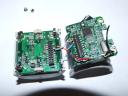
You can see the wires that I use for the LX mod soldered onto the boards in this view. The black and red wires are power from the USB connector and the orange wires are the PIN 13/PAD 13 connections for the LX mod. The blue wires are not used in this mod, but can be connected to a switch to allow the camera to be switched between LX and normal modes. Disconnecting the parallel port cable from the PC will also return the camera to “normal” mode, so I didn’t bother to fit a switch.
This is a view of the boards after the camera housing has been completely removed. I had bought some 2×10 IDC headers to connect the two boards side by side, but the connectors are not standard sizes and I wasn’t able to do this. Mounting the boards side by side would make it easier to add cooling so I may do this at some point by soldering ribbon cable between the two boards.
STEP 2
Prepare the project box
Drill a hole in the middle of the lid or back of the box, I chose the back of the box so that the lid can be removed without disturbing the wires. I use a small drill bit to start the hole then a 12mm hand held reamer to enlarge the hole to take the threads of the eyepiece adapter.
Drill holes for the wires. I drilled these near the top edge of the box allowing me to drop the cables in rather than remove the connectors and thread the wires through the holes. Use some side cutters to trim the top of the holes and finish off with a file to make sure there are on sharp edges to cut into the cable.
![]()
I had trouble removing the USB cable from the camera housing. It looked like the gromit could be turned 90° and slipped out, but I couldn’t move it and instead cut the case with some wire cutters. There’s no going back now!
STEP 3
Assemble the camera
Use the eyepiece adapter to thread through the box and into the threads on the lens mount attached to the bottom board. Don’t overtighten it but make sure it’s firm, this is all that holds the boards in place.
You don’t need to use the long reach eyepiece adapter now, infact I was concerned that if I tightened it up it may press against the CCD, so I swapped it for a standard adapter as seem on the right in this image. The long reach adapter is recommended for the SPC900NC while it’s in the original case
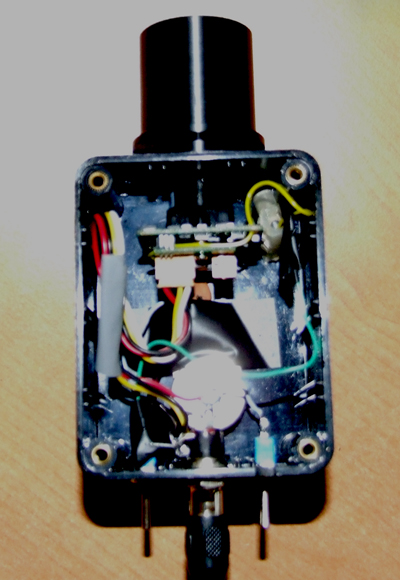
All the cables are reattached, note the holes in the box to allow the cables to pass through. The gromet and strain-relief sleeve on the CAT5 cable is for my peace of mind as I was concerned the stiff wires would break when the mount slews.
A view showing the cable exit points.
UAI CCD Variation
While searching the Internet for long exposure ideas I came across the Cookbook and Audine camera designs and thought how interesting it would be to build a camera. I looked for similar projects and was surprised that so few exist.
Marco Paolilli, a member of the QCUIAG group, posted a message saying his camera design was progressing so I thought I’d take a look and see what it was all about.
Marco and the team involved in the UAI CCD Project had come up with a simple design to make use of easily available components that wouldn’t be too difficult to build or require any special manufacturing techniques. Their idea was to use through the board components rather than surface mount which can be a bit tricky for amateurs.
I spent some time looking at the high level schematic thinking “I’m sure I could make that” but I wasn’t sure about the USB interface and how that would work. The UAI CCD Project uses a custom USB board from FTDI which has all the electronics neatly packaged into an easy to use board. I wasn’t familiar with the FTDI range so spent some time side-tracked looking through what they had to offer.
When I returned to the UAI CCD design I was struck by the idea that if I replaced the USB245M module with the DLP-2232PB, not only would I have the USB functionality but also the micro-controller which could be programmed through the USB port which again meant the RS232 portion of the design was not required. Could this be right? I can replace 3 of the modules with one easy to use board?
I haven’t programmed a PIC micro-controller before, but I had a little experience with the old Zilog Z80 so wasn’t completely new to low level coding. I downloaded some PDFs on how to program the PIC and to my amazement found it also contains a 10bit Analogue to Digital Converter or ADC. The UAI design uses a 16 bit ADC giving 64K colours or shades, but 10 bit would give 1024 which is huge improvement over the 256 found in most webcams.
So I’ve taken a carefully thought out and constructed design and replaced half of it with some crazy ideas of my own and to top it all decided to use the ICX255 with the 2 dead pixels that came out of my first 1004x as a sensor (see 1004x below).
I thought that if I make each of the component parts on a separate board I could change things later on and even add a 16bit ADC at some point.
I built the amplifier using a pin compatible op-amp which was pennies rather than pounds, if it doesn’t work I can always drop the correct chip into the socket. It has a similar construction being low noise high gain MOSFET in design, but I have my doubts and will not be surprised if I have to resort to plan B before too long.
For the vertical drivers I had no choice but to use the MAX333A chips which the Audine Camera also uses. This circuit was again built onto a separate board using headers and ribbon cable to connect them. I’ve been playing with PCs for some time so ribbon cable is something I have in abundance.
When I came to wiring the boards to the micro-controller I realized that by rushing head-first into this I hadn’t considered that the DLP-2232 may not have the same access to the micro-controller as I would have using the chip directly. All thoughts of using the UAI firmware, and software for that matter, were dashed.
So I worked out the pins that I had, and those that I needed, I assigned actions to ports and set about designing the firmware. I learned to code in C, I learned to how to enable and use the built-in ADC and I learned how to control the ports. I also built a Windows application in Delphi to allow me to send control signals to the camera to initiate sequences and view the values returned. I like a challenge.
The Sony Datasheet for the ICX255 has timing diagrams for each of the required signals but I was way out of my depth. I contacted Marco via email as he had already been through this process so had a good idea what I would need to move things along. Although Marco had been working with a different CCD sensor, apart from the voltages used, it seems all the timing elements are the same. Thanks Marco.
So after comparing the timings that I’d calculated to those of Marco’s it appeared that I’d miss understood some of the basic concepts. I rewrote the firmware that evening and switched the action assigned to 2 pins to allow my horizontal pulse and RG signal to occur simultaneously.
I haven’t got much further at the moment. I have vertical signals that look like they should. I have horizontal signals that again look correct, all voltages are correct and I’m sure I’m very close. I should be able to vary the signal coming from the CCD board by covering it or allowing light onto it but in both cases the signal appears to be saturated. The good news is the Op-Amp circuit seems to work and the output is the amplified, inverted pixel value. The bad news is that it takes in excess of 20 seconds to read a single frame (2 fields).
Apart from some strange patterns I haven’t had a sensible output from the camera yet, but will give it some thought as time permits. At least the power supply I built for it works!
Moon Camera
With a lunar eclipse due on the 3rd March 2007 I was wondering how I’d get the whole moon in a single frame without having to buy a focal reducer, which it seems may not work with the newtonian scope. I decided to see if I could mount a 200mm Minolta zoom lens (£10 off ebay!) onto the ICE CM2xUTP camera. The camera has a screw mount that fits a standard camera tripod and if I could firmly attach the lens I should be able to keep everything pointing skywards without worrying about pieces falling off.
An adapter is available to connect a c-mount to a Minolta MC mount, but in order to keep the costs down I set about the lens with some small screwdrivers and managed to remove the mount which left an inner tube with a 29mm internal diameter which is threaded and tapers.It just so happens that my 2x barlow fitted nicely into the end of the tube, only a milimeter or so but enough to test if it worked. The barlow then gave a convenient socket into which the camera could be inserted.
A little electricians tape secured the barlow to the lens and I later added a hose clamp to make the joint more secure. Some tests through the window showed that I could focus on distant objects so the whole lot made its way onto the patio that evening for a moon test. Stars were too faint to pick out but the moon filled my screen however the image was not the best with the square pixels clearly visible.
When it was time to film the eclipse I decided to go with the trusty 1004x instead of the ICE CM2XUTP and taped the whole assembly to the top of the tripod. I regretted the descision when at full eclipse the moon appeared to shimmer and turn a deep red colour and I was left with a mono camera. I’ll put the images onto the solar system page when I get a minute, but they’re not very good as the lens wasn’t lined up correctly with the CCD so not even registax could salvage anything decent from the 130+ videos that I took that evening.
1004x Camera
After hunting around on Google looking for a camera that would give me a chance of capturing faint objects I found some information about the 1004x board camera. Sold for just £43 through RF Concepts and with a lux rating of 0.003 I thought I’d get one and see what it could do.
The unmodified camera worked like a dream with views of M42 and Star Clusters like M15 far exceeding my expectation after failing to capture any image with the Trust SpaceC@m. After a few nights of aiming the camera skywards I started to wonder if modifying the circuit would allow me to capture even fainter objects. I found lots of refences to the JG mod (Search Google) and finally settled on Willie Koorts site to guide me through the changes.
I added both the Boost option and Manual Gain, and opted to cut pin 16 rather than attempt to de-solder and lift it. I used hot melt glue to secure wires to the circuit board to prevent unnecessary movement and picked up the components via mail order from Maplin. The whole lot fitted nicely into a maplin project box with the Mogg Adapter holding the board firmly to the underside of the lid.
I don’t have any images of the original mod so can’t show you how it looked inside the box. Although this image shows the unmodified board attached to the lid.
The mod was successful with boost giving me high noise, high gain, and manual gain giving me some control with brighter objects but Saturn and the Moon were still too bright even with a skyglow filter. I found boost to be more useful than the gain control and Registax was able to remove most of the noise and dead pixels during stacking with darkframe subtraction. I say dead pixels because I was most anoyed to find 2 dead pixels on the camera. I later came to appreciate 2 dead pixels was good!
I wanted more, I could now see really faint objects, fainter than I could make out through the eyepiece although I later found my primary was so dirty that I’m surprised I could see anything through the eyepiece. I looked around for long exposure mods, but having a dobsonian mount means you can’t track objects as they apparently glide across the sky, but rather you need to video them as the cross your field of view and then stack the results. What if I could double the exposure, or maybe 5 times the exposure surely that would make the camera exceptional? I went back to Google, and found long exposure had been done and the same names, Steve Chambers (of SC mod fame) and John Grove (JG), kept cropping up. All the long exposure mods use a parallel port cable to allow a PC or Laptop to control the exposure from seconds to minutes. I needed to increase the exposure from 1/25th second to 1/10th or 1/5th not to 5 seconds, this would lead to a streak across the screen rather than increased detail and fainter stars.
I decided to take matters into my own hands and after a quick scan through the data sheets I made a circuit based on a binary ripple couter. The idea being to intercept the clock signal that drives the frame rate and use the ripple counter to reduce this by, initially 2x but with the option through jumpers to change this to 4x, 8x and 16x.
I was too keen and visions of distant galleries clouded my judgement. I managed to bridge about five pins on the one chip with a blob of solder that just appeared as if by magic. No amount of braid, solder pumping or scraping with pins and sharp knives made any impact and attempts to get the soldering iron involved in the cleanup just made things worse. After an operation that lasted well over 4 hours I had to finally down tools and admit that I couldn’t save this one.
My wife is very understanding and after letting her know how much I would like another 1004x she finally agreed on the condition I didn’t trash it.
So after a few days waiting for the new camera I couldn’t wait to get it in the Maplin box and start imaging again. To my horror this board had at least 8 dead pixels with others which brighten as the camera warms up (hot pixels). I can’t believe I trashed the one with only 2 dead pixels! Have a look at the dark frames below to see the difference between the first and second 1004x boards.
True to my word I wasn’t about to inflict the same mods on this board, so instead tried a variation. I hadn’t had much success with the manual gain so this time I routed the manual gain potentiometer to the boost pin (14) and removed the connection to +5v. Now I had manual boost, no need to cut or lift pins, only one wire to solder to the board and a way to balance boost against noise, woohoo.
I’ve left it like that, too nervous to try anything like an extended exposure mod, but I’m happy with the results at the moment so I’ll continue to push this camera to its limits before I try anything like that again.